How We Reconciled a Zoho Payments Clearing Account in Zoho Books
A real-world example of finding and fixing an unexpected reconciliation difference
When a business uses Zoho Payments to collect customer payments, the accounting can look straightforward until you try to reconcile the Zoho Payments balance with Zoho Books.
Recently, we worked through exactly this situation.
The client had customer payments coming through Zoho Payments, refunds being processed, payment fees being deducted, and payouts being sent to the bank. Everything seemed reasonable, but the Zoho Payments clearing account would not reconcile.
The difference was significant.
And one transaction type stood out: Top-Ups.
The Problem
At first glance, it seemed that the reconciliation should be simple:
Customer payments − refunds − fees = bank payout
But when we compared the Zoho Payments activity with the accounting records, the numbers didn’t match.
The difference was exactly the amount of the Top-Up transactions.
For example, Zoho Payments showed:
$990 Customer payment
$29.01 Processing fee
$2,490 Top-Up
$2,490 Refund
$1,928.55 Top-Up
$1.928.55 Refund
$960.99 Payout to the Bank
The natural question was:
If these Top-Ups are showing in Zoho Payments, where did the money come from?
The Investigation
We went back to the bank statement and searched for the Top-Up amounts.
There was no $2,490 bank transfer.
There was also no $1,928.55 bank transfer.
That was an important finding.
Rather than creating accounting entries simply to make the reconciliation balance, we stepped back and looked at how Zoho Payments was treating these transactions.
The Top-Ups were part of the Zoho Payments account balance and were associated with the corresponding refunds.
In other words, they were relevant to the Zoho Payments reconciliation, but they were not new deposits into the company’s bank account.
The Key Accounting Insight
This is where payment clearing accounts can become confusing.
A Zoho Payments clearing account is not the same thing as the company’s bank account.
It represents the flow of money through Zoho Payments.
That means the clearing account can contain transactions that don’t immediately appear on the bank statement.
We therefore separated the two reconciliations:
Zoho Payments reconciliation
We reconciled all relevant activity within Zoho Payments, including:
Customer payments
Refunds
Processing fees
Top-Ups
Adjustments
Payouts
Bank reconciliation
We reconciled only the actual money that reached or left the bank.
This distinction solved the mystery.
What Happened to the $990 Payment?
The $990 customer payment was straightforward.
Zoho Payments deducted a $29.01 processing fee:
$990.00 − $29.01 = $960.99
The company then received $960.99 in its bank account.
So the bank reconciliation was based on the actual $960.99 deposit, not on every transaction that appeared in Zoho Payments.
What About the Top-Ups?
The two Top-Ups totaled:
$2,490 + $1,928.55 = $4,418.55
And the corresponding refunds totaled exactly:
$4,418.55
So although the Top-Ups were important for understanding the Zoho Payments account balance, they did not represent additional business revenue or a bank deposit.
And because there was no corresponding bank transaction, we did not create one.
That is an important principle in accounting:
Never create a bank transaction simply to make a reconciliation balance. Find out what actually happened first.
The Final Reconciliation
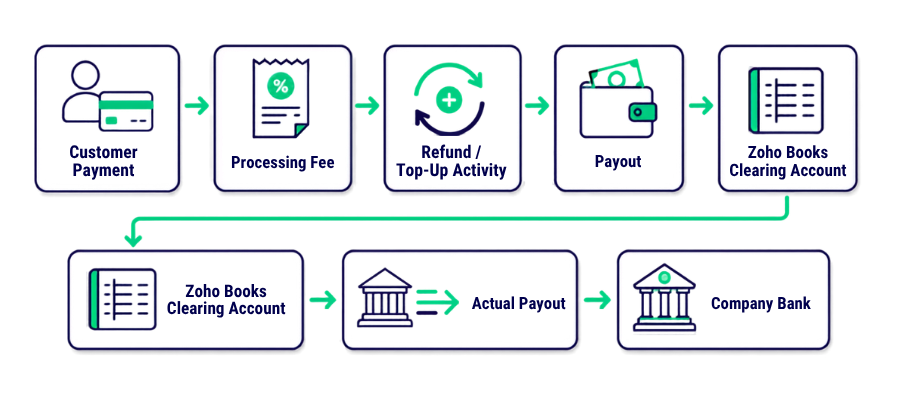
Once the transactions were properly classified, we could look at the Zoho Payments account and the bank as two connected but separate pieces of the accounting process.
Zoho Payments
This gave us a much cleaner reconciliation process and prevented internal Zoho Payments activity from being incorrectly posted to the bank.
Understanding the Zoho Payments Reserve
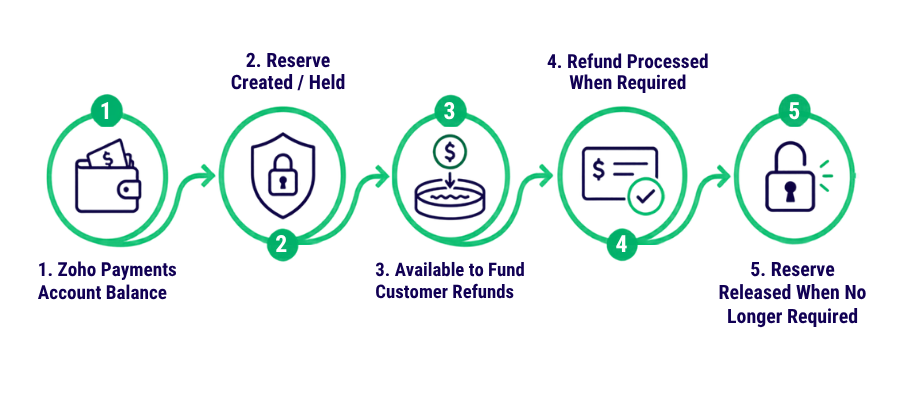
There is another important component of the Zoho Payments account that can easily confuse reconciliation: the Reserve. In this case, the Reserve represents funds held within Zoho Payments that are available to cover customer refunds when required. The Reserve can be utilized when a refund needs to be processed and may subsequently be released back into the available account balance when it is no longer required. Because Reserve movements are part of the Zoho Payments balance but may not correspond to a direct bank transaction, they need to be reviewed as part of the Zoho Payments clearing account reconciliation rather than automatically treated as bank activity.
A simple way to explain the flow
This is another reason why the Zoho Payments balance cannot simply be compared to the bank balance. The reconciliation needs to account for payments, refunds, fees, Top-Ups, Reserves, Reserve Releases, and payouts separately.
What We Learned
The biggest lesson wasn’t about one particular transaction.
It was about understanding what the clearing account represents.
When a payment platform doesn’t reconcile, the answer isn’t always to look for a missing bank transaction.
Sometimes the issue is that transactions inside the payment platform are being classified incorrectly, or simply being left out of the reconciliation.
A proper reconciliation should answer three questions:
1. What happened inside Zoho Payments?
2. What was actually transferred to the bank?
3. What should be reflected in the Zoho Books clearing account?
Once those three pieces are connected, the reconciliation becomes much easier to understand.
How ZBookkeeping Can Help
At ZBookkeeping, we work with businesses that use Zoho Books and the broader Zoho ecosystem, not just to enter transactions, but to make sure the accounting records actually make sense.
Our team can help with:
Zoho Books setup and cleanup
Bank and clearing account reconciliations
Zoho Payments reconciliation
Historical bookkeeping cleanup
Payment and refund reconciliation
Month-end bookkeeping
Multi-entity accounting
Zoho Books migrations
Accounting automation
Financial reporting
The goal isn’t simply to make the numbers balance. It’s to understand why they balance and make sure the accounting behind them is correct.